


Nice Weather
4.0671.00 Reviews
App Specs
- Version
- 1.4.3
- Updated On
- License
- Free
- Downloads
- 5,000,000+
- Developer
- Znd Digital
- Categories
- Weather
- Platform
- Android, iOS
Screenshots
 Analysis by AppCompare
When it comes to weather apps, it feels like there’s a million of them out there, right? But let me tell you about this one called Nice Weather. I’ve been playing around with it for a while, and honestly, it’s got some cool features that make it stand out from the usual suspects.
First Impressions
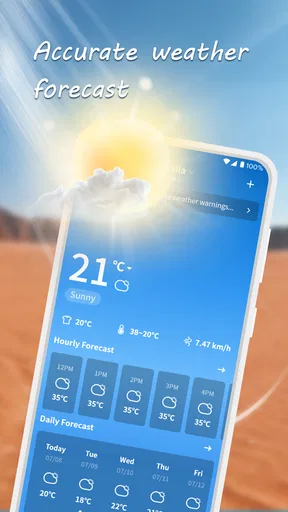
So, what’s the deal with Nice Weather? Well, right off the bat, I loved its clean and intuitive design. The app greets you with a bright and friendly interface that's super easy to navigate. No more getting lost in endless menus trying to find out if you should grab your umbrella or not. It’s all there, clear as day.
User Experience
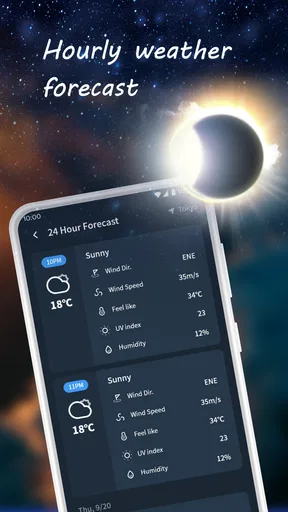
Using it is a breeze. The app gives you a detailed forecast that's easy to understand, even if you're not a weather guru. You get all the essentials like temperature, humidity, and wind speed. Plus, it provides a nifty hourly breakdown, so you can plan your day without any weather surprises.
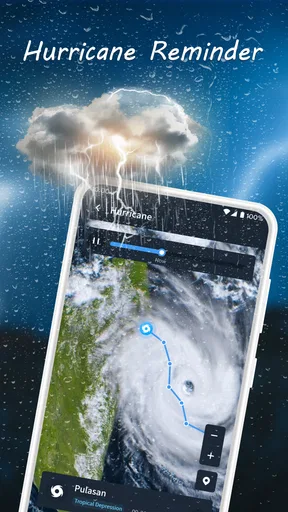
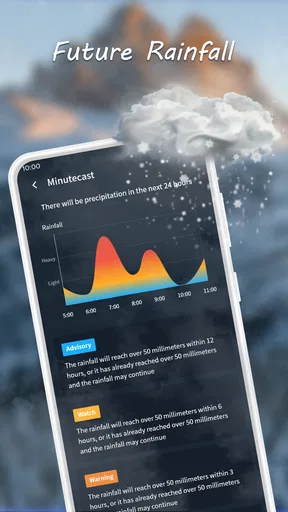
One of my favorite features has to be the weather radar. It’s perfect for those moments when you want to know exactly where those storm clouds are lurking. And let’s not forget about the customizable notifications. You can set it to give you a heads up about specific weather conditions, like a sudden rain shower. Pretty handy, right?
Performance
Now, I'm not gonna lie, some weather apps can be a bit of a drag on battery life. But Nice Weather runs smoothly without guzzling all your phone’s juice. It updates quickly, so you’re always in the loop with the latest weather updates.
Extra Features
If you're into a bit of weather trivia, you'll love the fun facts sprinkled throughout the app. It’s a nice touch that adds a bit of personality to your daily weather check-ins. And for those who love a good visual, the app includes beautiful background images that change with the weather conditions. It's like getting a mini art gallery with your forecast!
Oh, and did I mention it’s available on both Android and iOS? So, no matter what device you’re using, you can keep up with the weather in style.
Worth Reading Before You Choose

Flipboard Shows What News Apps Must Do Beyond the Feed

Switching to Android Auto Means Rethinking Your Driving Routine

Google Calendar Makes a Crowded Week Easier to Manage

Ludo King Makes the Most of the Minutes Between Plans

Baby Panda World Brings Quick Play to Modern Phones, but Its Game Library Feels Busy

ESPN’s Live Game View Makes Following Close Games Easier
Nice Weather is a free weather app from Znd Digital, and its 4.4 average rating reflects a warm reception from users. It has more than 1 million installs and around 8,500 ratings, so it has found an audience without needing to be treated as the only weather source you’ll ever need. It is rated for Everyone, and version 1.3.5 runs on Android 6.0 and later.
Making the Forecast Useful
The most practical way I’d use the hourly view is to check it at the moment a plan might change, rather than repeatedly opening the app out of habit. For example, before walking to a shop or taking a longer route home, I’d compare the next few hours with the time I expect to be outside. Temperature tells me how to dress; wind speed and humidity help fill in the comfort picture. That is more useful than relying on a single daily high and low.
The radar is best treated as a close-range planning aid, not a guarantee that every shower will land exactly where the screen suggests. If rain matters, I’d check the radar and the hourly forecast together, then leave a little margin before committing to an outdoor plan. A notification can be a helpful reminder, but it works best as a backup to a quick check rather than as a promise that every change will be caught in time.
Where It Fits Among Weather Apps
Compared with a bare-bones forecast that shows only the current temperature and a short outlook, Nice Weather gives you more to work with: hourly detail, wind and humidity, radar, and condition-based alerts. Compared with a more technical weather tool, its friendly presentation and weather-themed images are more approachable, while the essentials remain easy to find. That balance is the main reason I’d consider it for everyday use.
There is a trade-off, though. A clean screen is welcome, but someone who wants dense charts, specialist meteorological layers, or extensive planning tools may prefer an app built around those needs. Likewise, if you already have a dependable weather app that offers the exact local detail you need, switching just for a different look may not add much. I’d judge it by whether the hourly view and radar make a real difference to your routine.
Who Should Try It
I’d recommend it to someone who checks the weather before commuting, walking a dog, running errands, or deciding whether to move a casual outdoor plan indoors. The combination of a readable forecast and radar is especially handy when conditions may change during the day. For a simple routine, I’d save the places I check most often if the app offers that option, and turn on only the alerts that would genuinely change my plans; otherwise, notifications can become noise instead of help.
Picture a weekday when you need to leave home on foot and later cross town for an appointment. I’d check the hourly outlook before heading out, note whether wind or humidity could make the temperature feel less comfortable, then glance at radar before the second trip. If rain seems possible, I’d carry a light layer rather than assume an alert will arrive at the perfect moment. This kind of small decision-making is where the app’s mix of glanceable information and a visual radar can earn its place.
It is less suited to people who need highly specialized forecasting for safety-critical outdoor work, or who want extensive scientific analysis in one screen. In those situations, I’d use a more specialized source and follow official local guidance where appropriate. Nice Weather makes the most sense as a convenient day-to-day companion, not as a substitute for expert forecasts when the consequences of getting conditions wrong are serious.
Small Habits That Improve the Experience
I’d avoid turning on every possible notification at the start. Choose the weather changes that would actually affect your day, then adjust after you see whether the alerts are useful. This keeps a genuinely important rain warning from getting buried among reminders you do not need. I’d also check the forecast close to the time of an outdoor commitment: weather can shift, so a glance from the previous evening should not be your only decision point.
The app’s changing background images and fun facts give a routine forecast check a bit of personality, but I see them as extras rather than reasons to trust a prediction. The useful core is still the information you can act on. If you want a purely utilitarian display, the visual flourishes may feel unnecessary; if you like a more welcoming interface, they make the daily check less sterile without getting in the way of the central task.
What to Expect Before Installing
Nice Weather was released on November 26, 2024, and is listed as a free app. That makes it easy to try if you want a clearer everyday forecast without committing to a purchase. Its short store description is “Nice Weather,” but what matters in practice is whether its hourly breakdown, radar, and notifications suit the way you make plans. I’d give it a few ordinary days of use and compare what it shows with the conditions you actually experience before making it my only source.
People often wonder whether a weather app can replace checking outside: I wouldn’t use any forecast that way. A forecast helps you plan, while looking at the sky and responding to changing conditions still matters. They may also wonder whether it works for quick checks or requires much setup; its straightforward layout makes a quick glance the natural use, while notifications are there for people who want extra reminders. For a trip or outdoor event, I’d check the forecast again nearer the time rather than rely on one early reading.
Oh, and did I mention it’s available on both Android and iOS? So, no matter what device you’re using, you can keep up with the weather in style.
In a nutshell, Nice Weather is like having a friendly meteorologist in your pocket, always ready to give you the lowdown on the weather with no fuss. If you’re looking for a weather app that’s both functional and fun, this one’s worth checking out. Trust me, your future self with dry shoes will thank you!
Pros
- User-friendly interface design.
- Accurate real-time weather updates.
- Customizable notifications.
- Global location coverage.
- Minimal battery consumption.
Cons
- Limited widget customization.
- Occasional ad interruptions.
- No offline mode available.
- Requires constant internet connection.
- Lacks detailed radar features.
FAQs for Nice Weather
What features does Nice Weather offer?
Nice Weather provides real-time weather updates, hourly forecasts, and a 7-day outlook. It includes detailed information on temperature, humidity, wind speed, and precipitation. The app also offers radar maps, severe weather alerts, and customizable widgets for quick access to weather information.
Is Nice Weather free to use?
Yes, Nice Weather offers a free version with basic features. However, there is a premium version available via in-app purchases, which unlocks additional features like an ad-free experience, advanced radar options, and personalized alerts. Users can choose based on their needs and budget.
How accurate is the weather data in Nice Weather?
Nice Weather sources its data from reputable meteorological services, ensuring high accuracy. It uses advanced algorithms to provide real-time updates and precise forecasts. Users generally report satisfaction with its accuracy, but it’s always recommended to check multiple sources for critical weather events.
Does Nice Weather offer any customization options?
Yes, Nice Weather allows users to customize the app to their preferences. You can choose between different themes, set notification preferences, and personalize the home screen widgets. The app also allows you to save multiple locations, making it easy to switch between them.
Is Nice Weather available for both Android and iOS devices?
Yes, Nice Weather is available for download on both Android and iOS platforms. The app is designed to be user-friendly across different devices, ensuring a smooth experience whether you're using a smartphone or a tablet. Check the respective app stores for compatibility with your device.


